Lumos
An immersive learning environment
- Role
- Product Design Lead
- Timeline
- 3 weeks
- Skills
- Designing a new app & brand from scratch
- Team
- Brittany Jain, Liz Delaney, Irfanul Haque, and Aradhana Murarka
Project Overview
Problem
Using an innovative technology to create a solution for online learning.
Goal
To design a mobile app & hardware device that creates an engaging & immersive experience for virtual learners.
User Research
Objectives:
- Understand the end-to-end process of how people use online platforms to learn virtually.
- Understand what pain points people face when learning in a virtual or remote setting.
- Learn what the ideal process could look like for virtual learners.
1:1 Interviews & Survey
From our 1:1 research interviews & survey results, we found that people wanted to have the ability to learn from their home, however also wanted classes to be interactive so they can get real-time feedback.
Research Findings
After consolidating our research we summarized our findings. From our research, we determined it was important to provide users:
- The ability to learn hands-free.
- An interactive learning environment with instructor accessibility.
- The ability to determine they were learning from the right people.
Competitive Analysis
My competitive analysis indicates that while the online learning industry employs diverse strategies, a hands-free, interactive learning environment still remains untapped.
To address this gap, we imagined designing hardware devices for hands-free, interactive learning and a mobile app for class & instructor vetting.
Airbnb Online Experiences
Strengths
- Interactivity
- Host expertise
- Scalability
Weaknesses
- Laptop/phone dependent
- Lack of standardization
- Platform fatigue
BenQ Smart Projector
Strengths
- Brand recognition
- Unique technology
- Energy efficiency
Weaknesses
- Physical projector board
- Price point
- Complexity
Meta Quest AR headset
Strengths
- Hands-free
- Includes visualization
- Innovative technology
Weaknesses
- Safety considerations
- Limited content
- Privacy concerns
Persona
After conducting our user research, we defined the main challenges users faced by creating a persona: Emily. Emily is a NICU nurse who enjoys learning new hobbies and skills as it relieves stress from her day job. She is interested in learning how to bake but doesn’t have much experience. She often gets overwhelmed with the amount of resources there are online and struggles when the instruction is not hands-free.
User Journey Map
When crafting a user journey map we imagined Emily going all the way from purchasing the devices to referring others to the virtual platform. However, we decided to focus our prototype on the core experience of setting up the hardware, finding a class, and attending it. Within this process is where we can design solutions to address the unmet needs of online learners.
Purchase and get onboarded with the learning device
Select a class that meets the user’s needs & sign up
Attend the class and follow along with instructions
Recommend the class and learning device to others
Browse the course catalog & read class descriptions
Prepare for the class by buying supplies and setting up the environment
Provide a review with feedback on how the class went
Problem Statement
“How might we create an engaging and hands-free learning environment that enhances a users’ online learning experience?”
Strategy
With Emily’s journey in mind, we began sketching and chose to design the projector experience first, focusing on enhancing the physical learning environment before designing the hardware and mobile app.
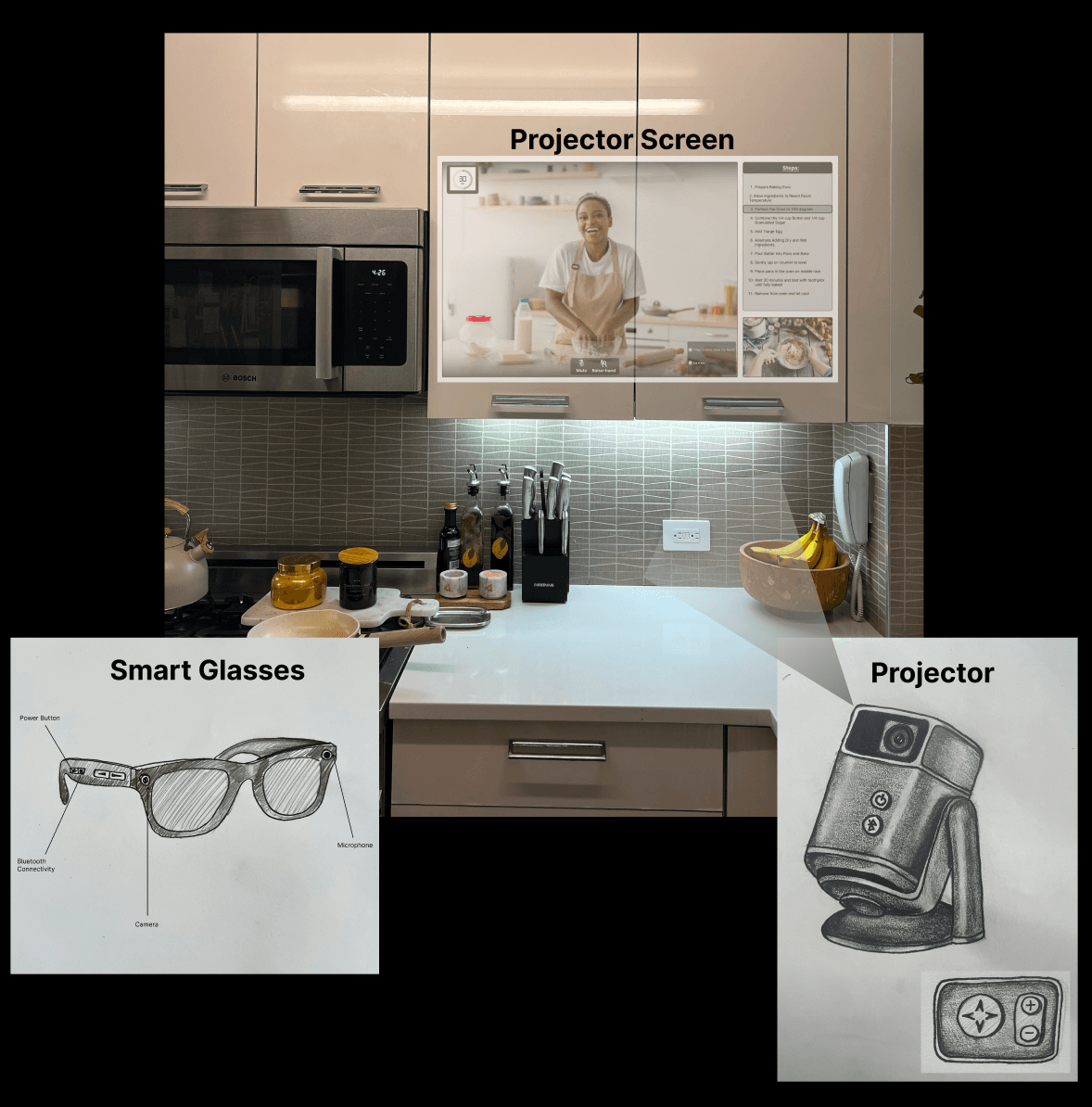
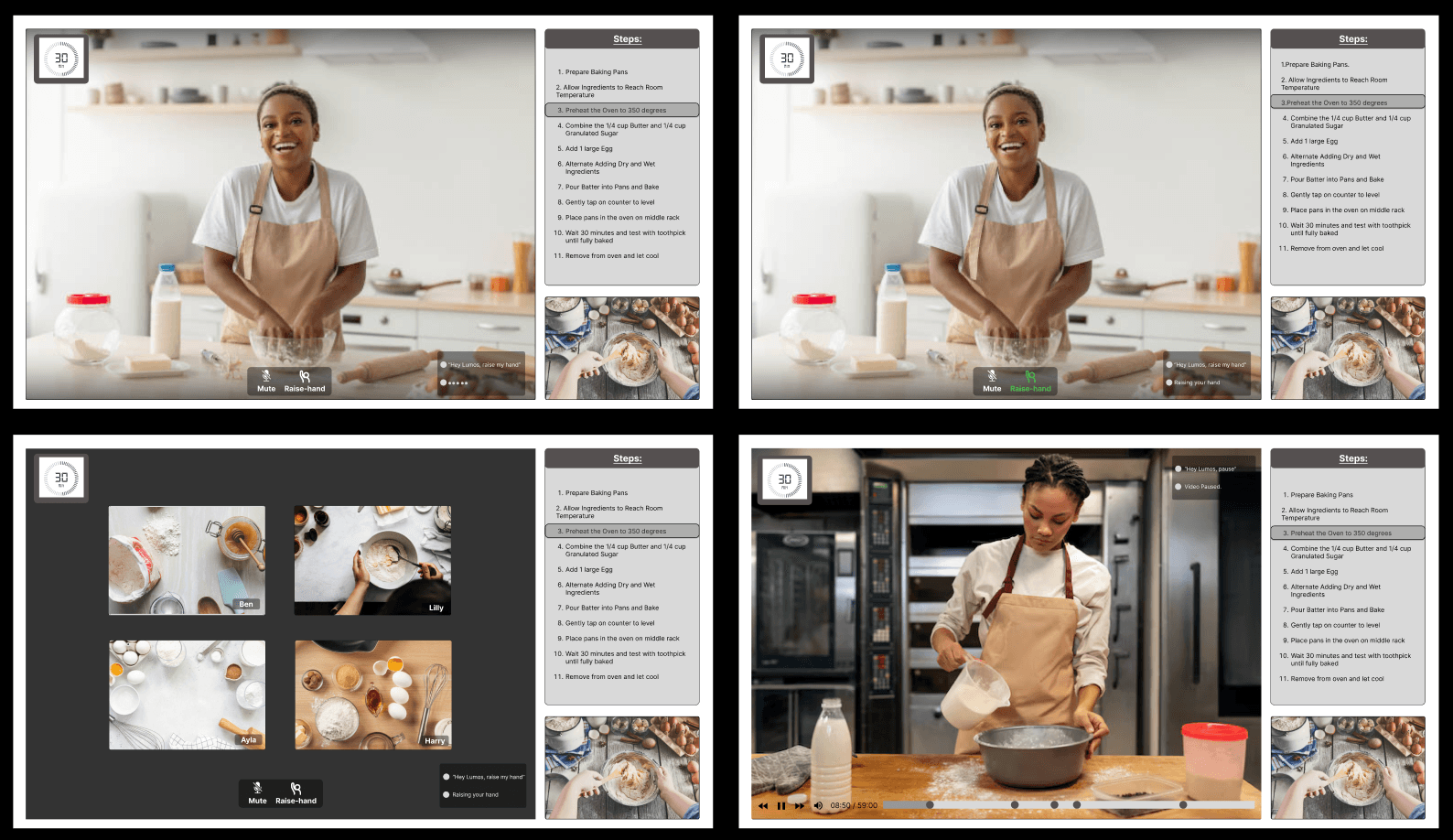
Through several iterations, we kept the projector display minimal and distraction-free, showing only essential content: the instructor view, user view, and instructional steps.
For the mobile app, we prioritized easy class access, personalized recommendations, and facilitator reviews to help users evaluate expertise.
We also explored projector and smart glasses concepts, incorporating features like Bluetooth, a microphone, camera, and volume controls to support a hands-free, voice-enabled learning experience.
Sketches
Prototype & Test
Usability Test Results
Using our low-fidelity prototype, we conducted eight usability tests with the goal of assessing if users could find a specific class, Bluetooth connect the hardware, and join a session.
Overall, we found that users needed more prompting to effectively navigate the app. Also, that our button placement needed to be more visible.
- 100% of users were able to complete the tasks outlined
- 100% of users were able to describe the purpose of the app
- User needs more prompting to setup devices with Bluetooth
- Users had a tough time navigating the Connecting Device Page
- View schedule button needs more visibility
Final Designs
Retrospect
Impact
“Usually I’m hesitant to take an online class, however with this unique kind of learning environment I feel like I would really enjoy the experience.”
— User Tester #4
Lessons Learned
Through this project we learned how to design across multiple platforms & how to think about the industrial design of our hardware devices.
Next Steps
We plan to create a dedicated section where users can access recorded content and design the user flow for instructor-led classes.